vacancyd
Gate borrowed AI requests on owner policy and available resources. Windows and Linux. Apache-2.0.
App website · Documentation · Setup guide · Release verification · Security
Release status: source is available. Signed version 1.0.0 downloads and container images are being prepared; a source tag alone is not a published binary release.
Your gaming PC has the best GPU in the house and sits idle most of the day. Your homelab wants that VRAM. The obvious move is to point the cluster at the box. That has an obvious failure mode: a 13 GiB model loads in the middle of a boss fight.
vacancyd is the motel sign for your hardware. Put it in front of a dedicated inference server and point borrowers at the gate. VACANCY means an upstream can admit new work; NO VACANCY means it refuses with HTTP 503, a reason and Retry-After. Gateway failover depends on the gateway's adapter and configuration.
By default, an upstream uses owner_scope = "host", so owner presence can refuse its new work. Accepted work follows its configured cancel, drain or finish policy; the default drain window is 30 seconds. Closing a proxy connection does not prove that the upstream stopped computing or released memory. Automatic model unloading is a separate, adapter-specific option.
An upstream set to owner_scope = "resource" can keep lending while the owner is present, subject to its resource checks. GPU pressure can reclaim affected work; memory and CPU capacity checks refuse new work but do not reclaim accepted work. Status and the console name exempt routes. Direct requests to the inference server bypass the gate, so keep its listener inaccessible to borrowers.
The owner console
See what is lending, what is withholding and why. The console brings resource readings, workload decisions, supported settings and diagnostics together, with a pause control when you need it.
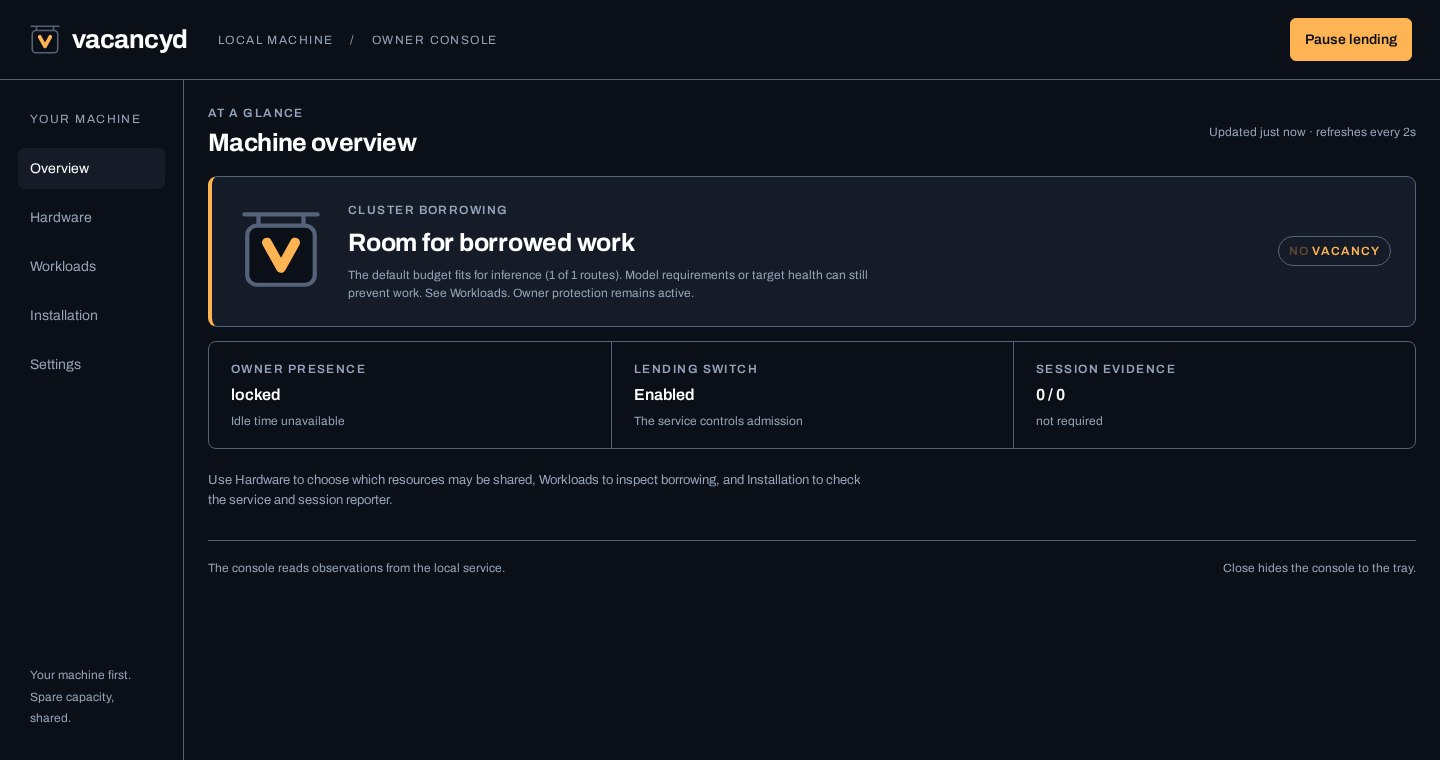
The version 1.0.0 console rendered with example data, not measurements from a user machine.
| Your question | Where to look |
|---|---|
| Can the machine lend right now? | The overview shows owner policy, resource checks and the vacancy sign. |
| Why was a request refused? | Workloads show route decisions and required resources. |
| How do I pause or change lending? | Use the console's supported controls; privileged changes require local administrator approval. |
| What does an owner return mean for active work? | The route's configured cancel, drain or finish policy decides. See admission and recovery. |
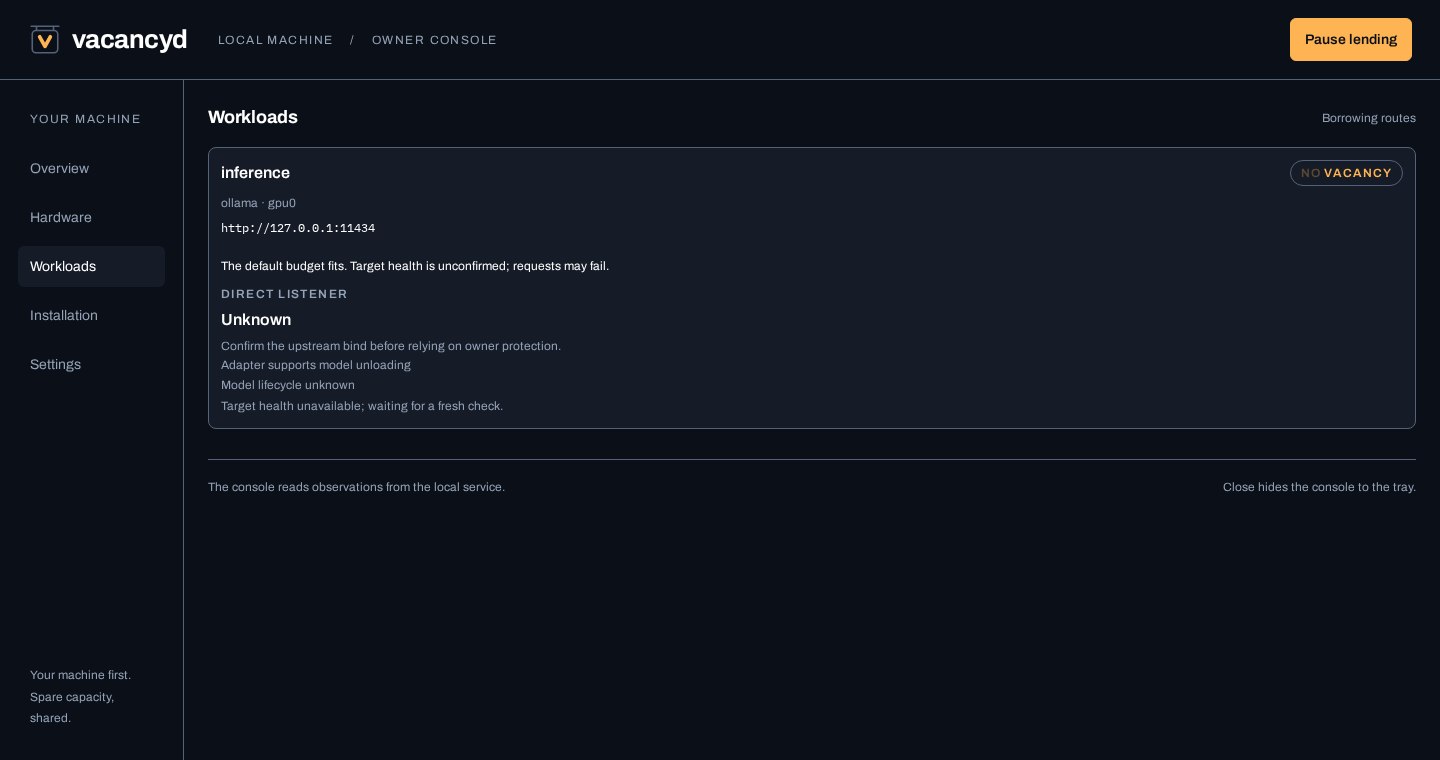
Example workload configuration. Explore the console or start with setup.
Where it fits
flowchart LR
    cluster["Cluster<br/>LiteLLM, etc."]
    subgraph workstation["workstation"]
        gate["vacancyd<br/>:11435 / :8189"]
        upstreams["Loopback upstreams<br/>Ollama :11434<br/>ComfyUI :8188"]
        state["Cached capacity<br/>and owner state"]
    end

    cluster -->|borrow| gate
    gate -->|when vacant| upstreams
    gate -->|503 + Retry-After| cluster
    state -->|VACANCY / NO VACANCY| gate
What it does
- Gated reverse proxy in front of Ollama, ComfyUI, Chatterbox TTS, or the supported routes of an OpenAI-compatible server. The
llamacppadapter adds llama.cpp slot observations; the genericopenaiadapter does not establish compatibility with every server or endpoint. See the adapter route tables. One listener per upstream. Listed discovery and health routes pass through so a borrower's checks keep working. Routes that manage the upstream or read the owner's data on it, such as pulling models or reading the prompts llama.cpp is processing, are refused unless you allow them per upstream. Anything vacancyd does not recognize is refused rather than guessed at, and request bodies are bounded in size, memory and time. WebSocket upgrades are tunneled, so ComfyUI queue and progress updates work while the real service remains bound to loopback. - Per-model admission. "Is there room?" depends on which model is asked for: a 12B may fit right now while a 20B must wait. You configure measured footprints. vacancyd reads the model name from each request and checks the card's actual free VRAM before letting it through.
- Host policy plus per-resource pressure. Session state, media playback, and an explicit process list can reserve the whole machine for its owner. On Windows, attributed GPU utilisation separately refuses only the GPU used by work vacancyd did not admit. Unknown or stale required measurements refuse admission. An always-on lane on a card you never use, such as a small helper model on a display GPU, can opt out of host policy with
owner_scope = "resource"; only its own resources then refuse or reclaim it (see resource-scoped upstreams). - Targeted yield. With
yield_on_vetoenabled, supported adapters ask affected upstreams to unload models after their reclaim policy permits it. An acknowledgement is not proof that GPU memory has been recovered. See admission and recovery. - Prometheus metrics (
/metrics) so the borrowing side can watch the lender's true state continuously: free VRAM, veto state, admissions, active work by lifecycle phase, authentication decisions, refusals, yields. CPU exports utilization rather than meaningless free/total byte series. - Runtime switches. Disable lending globally or per resource without restarting:
POST /admin/lending/disable,POST /admin/resources/gpu0/disable. Every admin request carries the explicitX-Vacancyd-Admin: 1intent header in addition to any required credential. On Windows and Linux, local changes other than pausing need an administrator identified from the caller's account by the kernel: an elevated Windows administrator, for whom the owner console asks for approval, or on Linux root or a member of thevacancyd-admingroup, usingvacancyd admin-request(see authentication). - Built-in diagnostics. A temporary debug logging window that turns itself off, and a diagnostics export with the last six hours of GPU pressure decisions, from the owner console or
vacancyd diagnostics export(see logging and diagnostics). - Resources beyond GPUs. Every GPU, system memory and CPU are first-class resources with their own lendability rules, and an upstream can require several at once (
also_requires). - Knows when you walked away. A session-0 service cannot read idle time, so vacancyd ships a companion agent.
vacancyd-session.exeruns without a console;vacancyd agentshares its client code for foreground diagnostics. One agent per interactive session reports idle time plus the foreground app over an ACL'd named pipe. Setidle_lends_after_sand an unlocked machine you have wandered off from becomes lendable. Without the agent the daemon simply stays conservative. A missing or dead agent can never increase lending. - Designed for extension in source. Hardware probes, server dialects, and OS presence backends are separated behind Rust traits and compile-time registries. This is not a runtime plugin ABI: adding AMD GPU probes, a server-specific adapter, or a macOS presence backend means changing and rebuilding vacancyd. A server can already use the generic OpenAI-compatible adapter where its routes match the documented contract.
What it deliberately is not
- Not a scheduler or a cluster node. Your machine never joins anything. The cluster's view is one URL that is sometimes closed.
- No external control plane or telemetry. vacancyd needs no marketplace account. Listener addresses, upstream destinations, firewall rules and TLS are controlled by the operator; the daemon does not enforce LAN confinement.
- Not an interceptor of your own use. Local work talks to the real service port as before. Only borrowers go through the gate.
Install
Windows
Once the signed release is available, download its x86-64 MSI from the project's Releases page and double-click it. The installer adds vacancyd as a native automatic Windows service, so no service wrapper or Rust installation is required. Its deliberately inert starter configuration is written to:
C:\ProgramData\vacancyd\vacancyd.toml
The MSI adds Start menu setup and session-agent shortcuts, plus an all-users logon shortcut for the windowless session reporter. For an already-open session, choose Start session agent without elevation; see startup and upgrades. Right-click Setup (run as administrator) and choose Run as administrator, or use an elevated PowerShell prompt:
& "$env:ProgramFiles\vacancyd\vacancyd.exe" setup `
  --config "$env:ProgramData\vacancyd\vacancyd.toml" --replace-starter
Setup discovers candidate GPUs and services, asks about capacity and GPU pressure policy, and writes a validated configuration with a separate private borrow-only token. It preserves a backup of the starter and refuses to replace customized configurations. It does not activate lending, configure your upstreams, or change the firewall. Follow docs/setup.md to verify and activate it. This is guided command-line setup, not yet a one-click onboarding UI. Keep the real upstream loopback-only where possible: direct requests to a network listener bypass vacancyd's owner protection, although a network bind alone does not establish Internet exposure.
Advanced configurations still use vacancyd.example.toml and vacancyd check-config --config <path>. Upgrades and uninstall preserve the configuration. See docs/windows-service.md for service, firewall, and desktop-agent details. The v1 compatibility contract describes configuration upgrades, status clients and reporter version matching.
Linux
Once the release is available, download its archive for x86_64-unknown-linux-gnu, verify the adjacent SHA-256 sidecar, and follow Linux: install from the release archive: install the binary, turn vacancyd.example.toml into your configuration, validate it with vacancyd check-config, then install contrib/vacancyd.service. An aarch64-unknown-linux-gnu archive is also published as a preview: its build and package contents are checked, but v1.0.0 does not claim runtime qualification on physical ARM64 hardware. Linux’s default systemd-logind presence backend treats an unlocked local or graphical session as occupied, and locked or SSH-only sessions as unattended. Resource checks and route policy still decide admission. Attributed GPU pressure is not implemented on Linux yet. See the platform table below before enabling lending. Local changes other than pausing go through vacancyd admin-request as root or a member of the vacancyd-admin group; see local administration on Linux.
Container
The release images are intended for a Linux machine nobody sits at, such as a dedicated GPU box whose inference servers already run in containers. These pull commands become available when the images are published:
docker pull docker.io/probablyfinedev/vacancyd:latest
docker pull ghcr.io/maxfield-allison/vacancyd:latest
The image holds the binary from the Linux release archive, runs as an unprivileged user and reads /etc/vacancyd/vacancyd.toml from a read-only mount. Use owner.presence = "headless" there, and give it NVIDIA GPUs with the NVIDIA Container Toolkit (--gpus). Reading desktop presence from the host's systemd-logind is possible but needs extra host access. docs/container.md covers configuration, ports, state, GPUs, the logind mode and verifying an image's signature and attestations.
Verifying a download
Every release publishes a SHA256SUMS file covering all of its files, signed with the project's release key (packaging/cosign.pub). With cosign:
cosign verify-blob --key cosign.pub --bundle SHA256SUMS.sigstore.json SHA256SUMS
sha256sum --check --ignore-missing SHA256SUMS
The Windows MSI and executables are also Authenticode-signed. Releases are built, signed and published from the tagged source by the maintainer's release pipeline, which refuses to build a tag that differs from the source it builds; docs/releasing.md describes it. Development builds are not presented as supported releases.
Developer quickstart
To build from source, use Rust 1.89 or newer.
Before running the example on Windows, use the MSI's protected ProgramData\vacancyd folder, or create and protect it as described in the manual service procedure. Put the development configuration inside it and pass that file's path with --config to check-config and run. Its default recovery directory and pressure cache then stay inside the protected folder too. A configuration kept elsewhere needs explicit server.admission_state_dir and owner.gpu_pressure.state_file paths inside that folder. The owner console cannot save changes to a configuration kept elsewhere. Preserve existing recovery records when changing their location; see migration. The relative paths below need these adjustments on Windows:
$ cargo install --path .
$ cp vacancyd.example.toml vacancyd.toml   # edit: your GPU UUID, your games,
                                           # model footprints, auth and binds
$ vacancyd check-config
vacancyd.toml OK
$ vacancyd run                 # the service (on Windows, from an elevated prompt)
On Windows, run vacancyd agent in a second, non-elevated terminal in your desktop session. The agent subcommand exists only in Windows builds; Linux uses systemd-logind for session presence. See session-agent startup for Windows startup and diagnostics.
Configure a borrow token and change the gate listener from loopback to a LAN address, then point the borrower at it (e.g. LiteLLM api_base: http://<machine>:11435 instead of :11434). Check the sign:
$ vacancyd status
lending: ON   owner veto: clear
  gpu0   NVIDIA GPU A                    12000 MiB free /    16000 MiB   util   5%   lending
  gpu1   NVIDIA GPU B                     6000 MiB free /     8000 MiB   util  11%   lending
  mem    system memory                   30000 MiB free /    64000 MiB   util  53%   lending
  cpu    16 logical cpus              util      7%   lending
  ollama       0.0.0.0:11435 -> http://127.0.0.1:11434   VACANCY
  comfyui      0.0.0.0:8189  -> http://127.0.0.1:8188    VACANCY
When an upstream is exempt from the owner veto (owner_scope = "resource"), a second line names it, and while you are at the machine says whether it is still lending, for example paused for host-scoped upstreams only; 1 exempt upstream still lending: chatterbox.
Measuring model footprints
Don't guess the per-model thresholds. Measure them once:
$ curl -s localhost:11434/api/generate -d '{"model":"gemma3:12b","prompt":"hi"}' >NUL
$ curl -s localhost:11434/api/ps
# size_vram is the on-card footprint. Add ~500 MiB headroom.
That figure is what a request needs free when it may have to load the model. While the model stays resident, a request that reuses it as loaded is charged its resident_min_free_mib instead (default 0), so a borrower's follow-up turn is not refused for memory the model already holds. For Ollama, vacancyd credits a request only when it knows the request reuses the loaded context: its options.num_ctx equals it, it leaves num_ctx unset and the model's Modelfile fixes num_ctx to it, or an earlier request of the same kind (including one that left num_ctx unset, or used /v1) was seen to load exactly it. What was learned survives a restart of vacancyd. A request that changes another runner option is charged the full figure.
A scalar [upstream.models] value applies to every NVIDIA GPU dependency, and to the primary resource when that is system memory, as on a CPU-only upstream. A memory requirement is charged on top of that resource's owner reserve. For a split model, use a per-resource map such as "split-model" = { gpu0 = 10000, gpu1 = 14000 } and name every NVIDIA GPU dependency explicitly. Pin the dedicated upstream process with the same stable GPU UUID used by the resource selector and verify a test load with nvidia-smi; numeric device indexes can be renumbered inside the process.
Design notes
- Refuse before forwarding. Admission uses sampled policy and capacity before sending a work request to the upstream. A refused request does not begin the model load. This is not a latency or zero-contention guarantee; observations have a sampling cadence, and accepted work has its own reclaim policy.
- Capacity and pressure are different measurements. Total free VRAM from
nvidia-smianswers whether a model fits. Windows GPU Engine counters answer which PCI adapter is busy and whether that work belongs to an upstream process tree. vacancyd does not use unreliable per-process VRAM accounting. - Presence is about the human. Pressure is about the resource. A locked machine with an idle game still loaded can be lendable, while a background render can reserve only the GPU it is actually using. Keeping those facts separate avoids turning every signal into a machine-wide veto.
nvidia-smi, not linked NVML. It ships with NVIDIA's driver tooling on the supported Windows and Linux targets. Calls are isolated behind hard deadlines, so a stuck driver tool cannot stop presence sampling. On Windows it and the system tools are run by full path, never found through PATH.- Engage fast, release slow. The veto fires on one sample (protect the game now) and releases only after a grace period (don't resume lending because someone checked Discord).
Security
The API and proxy use scoped bearer tokens: borrow for the hardware, read for presence-bearing status and metrics, and admin for runtime switches. Loopback is trusted by default, for reading everywhere and for pausing on Windows and Linux; other changes there need an administrator identified from the caller's account (an elevated Windows administrator, or on Linux root or the vacancyd-admin group). A config with no tokens may bind only to loopback. Remote listeners fail validation unless the operator sets the conspicuous allow_unauthenticated_remote escape hatch. Tokens travel over HTTP, so use a trusted LAN or terminate TLS in front; a TLS proxy on the same machine requires trust_loopback = false. See docs/authentication.md. Report a vulnerability privately as described in SECURITY.md.
Platform support
| Platform | Capacity | Host presence | Attributed GPU pressure | Local administration | Proxy/API |
|---|---|---|---|---|---|
| Windows x86-64 | NVIDIA, CPU, RAM | WTS + user-session agent | GPU Engine counters, exact PCI mapping | by Windows account over the admin pipe; loopback reads and pauses | supported for a local interactive session |
| Linux x86-64 | NVIDIA, CPU, RAM | systemd-logind sessions + owner-process scan | not implemented (remains unknown) | by uid and groups over the admin socket; loopback reads and pauses | supported |
| Linux ARM64 | NVIDIA, CPU, RAM | systemd-logind sessions + owner-process scan | not implemented (remains unknown) | by uid and groups over the admin socket; loopback reads and pauses | preview; build and package verified |
| macOS | CPU and RAM code paths only | no presence backend | not implemented | loopback trust grants every admin action | unsupported for 1.0.0; no release package |
Linux should leave owner.gpu_pressure.enabled false until the DRM fdinfo backend is implemented. Its presence backend reads systemd-logind over the system D-Bus:
- A user session counts as someone at the machine when it is graphical (X11, Wayland, Mir, local or remote) or a local console login on a seat. SSH sessions, the per-user service manager and background sessions do not count.
- An unlocked counted session in the foreground refuses; a locked one lends once
owner.release_after_s(120 s by default) has passed since the session was last unlocked. Nobody signed in, including a display-manager greeter, lends once two consecutive reads agree and that same hold has passed. idle_lends_after_sworks only when the desktop reports an idle hint to logind. Playback and the foreground window are not read on Linux, so idle lending there cannot tell a film from an empty chair unless the player inhibits idle.owner.processesis matched against the processes of the user at the unlocked desktop.- If logind cannot be read, lending is refused. A host without systemd-logind sets
owner.presence = "headless", which stops consulting presence at all.
macOS is unsupported for this release. Its development code has no presence backend: it reports an unknown session and can lend on capacity and switches alone, even with someone at the desktop. Do not infer owner protection from a successful macOS source build. Windows Home qualification does not establish RDP hosting or two concurrently active interactive sessions. Those broader session cases are outside the v1.0.0 support claim.
See docs/prior-art.md for why this exists rather than a configuration of something that already did, docs/tiers.md for the availability tiers and how to measure them, and docs/architecture.md for the internals.
License
Licensed under the Apache License, Version 2.0. Third-party components retain their own licenses; see THIRD_PARTY_LICENSES.